SDK集成
更新时间:2026-04-03 13:47:38
SDK 导入
- 先从AIRTC控制台下载最新SDK压缩包:AIRTC_iOS_AppSDK_Latest.zip
- 对下载的 AIRTC_iOS_AppSDK_Latest.zip 压缩包解压后,里面的所有 framework 就是我们要使用的 SDK 了,如下图所示:
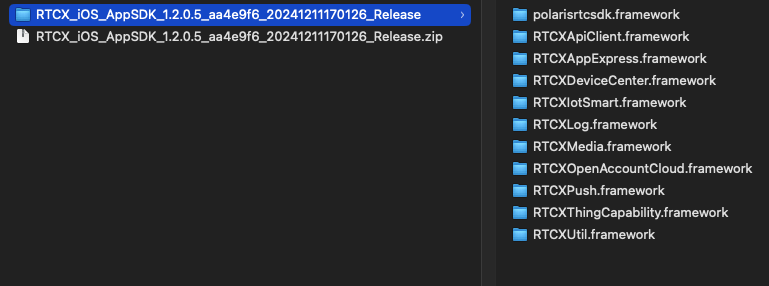
将所有 framework 拷贝至 Xcode 项目
Xcode 相关配置
Xcode -> Build Phases -> Link Binary With Libraries 导入以下系统库
VideoToolbox.frameworkAudioToolbox.frameworkAVFoundation.frameworkCoreMedia.frameworkSystemConfiguration.frameworklibiconv.tbd
Xcode -> General -> Frameworks,Libraries,and Embedded Content 设置 SDK 配置项为 Embed & Sign
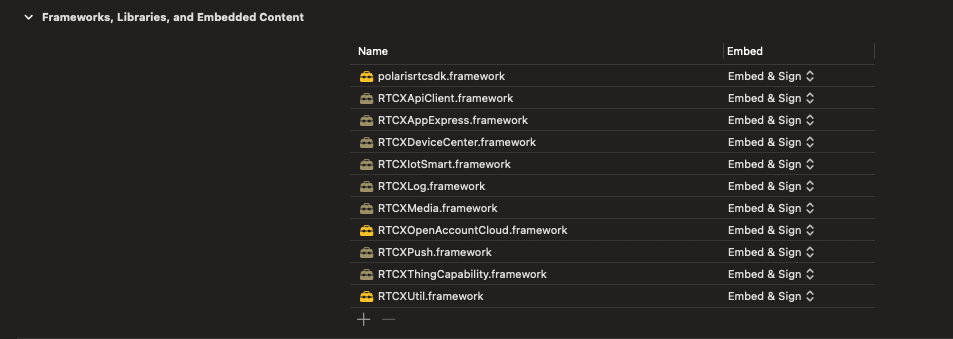
Xcode -> Build Settings 配置
Xcode -> Build Settings -> Enable Bitcode 设置为 NO
Xcode -> Build Settings -> Other Linker Flags 值加入 -ObjC